
Forge Plugins
New features as plugins. The core stays as it is.
A plugin adds task screens and business logic to the Forge Platform. It takes zero Java, leaves the core untouched and appears inside the Portal as if it had always been there.
New business features arrive from outside the core.
What used to mean changing the platform itself now ships as a plugin: a separate service the platform calls on your users’ behalf, with their identity and their rights.
Zero Java per plugin
The platform learns about a plugin from configuration alone. There is no change to the core service and no fork to maintain.
Its own release
Each plugin ships as its own container image and runs next to the platform, not inside it.
Switched on phase by phase
A process phase swaps its task form for a plugin screen. Every other task keeps the forms it already has.
A request path your architects can follow.
A browser never talks to a plugin. Every request passes through the platform service, which checks who is asking and signs what it forwards.
- One front door
- Browsers talk only to the platform service. Plugins live on the internal network: no CORS, no login, no route back.
- Every call is signed
- Ed25519, scoped to the user, the task and the intersected privileges, valid for 60 seconds.
- No access to your database
- Plugin data is one versioned JSON document, kept and validated by the platform.
- Looks native
- Screens mount inside the Portal’s task, in its theme and language. The Portal keeps Complete.
Pricing & deal approval, built as a plugin.
The first plugin built on the system prices a deal inside a Portal task, challenges it before approval and leaves the decision to the process.
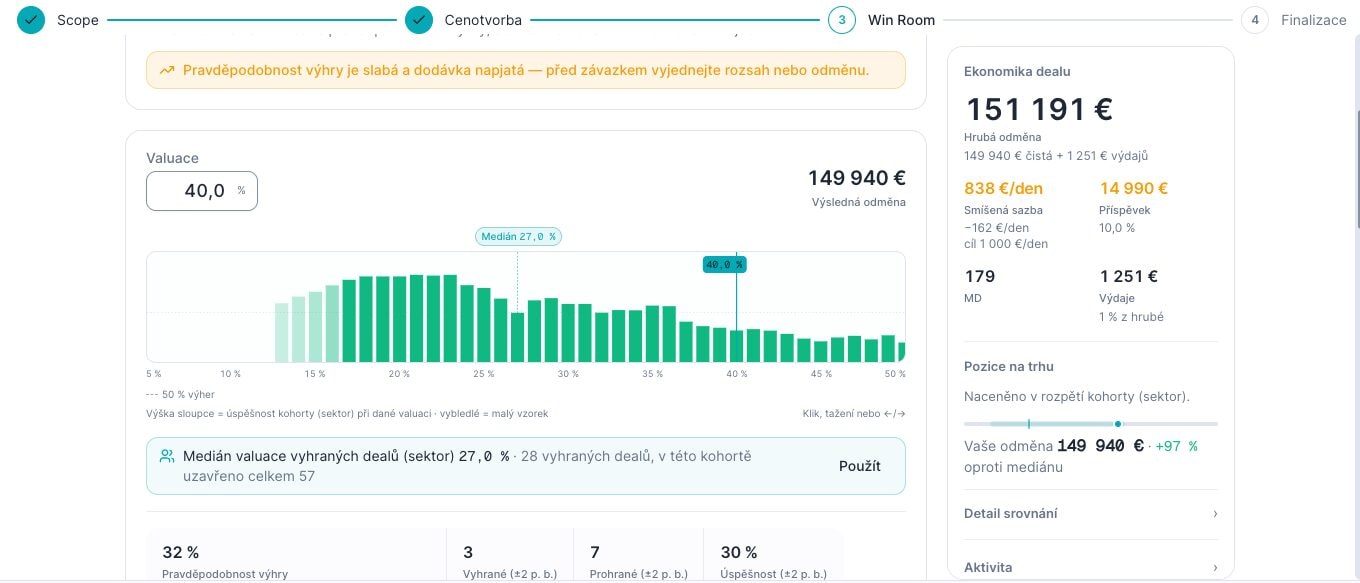
Win rate against comparable deals
A win-rate histogram of comparable deals by price, next to this deal’s economics and market position.
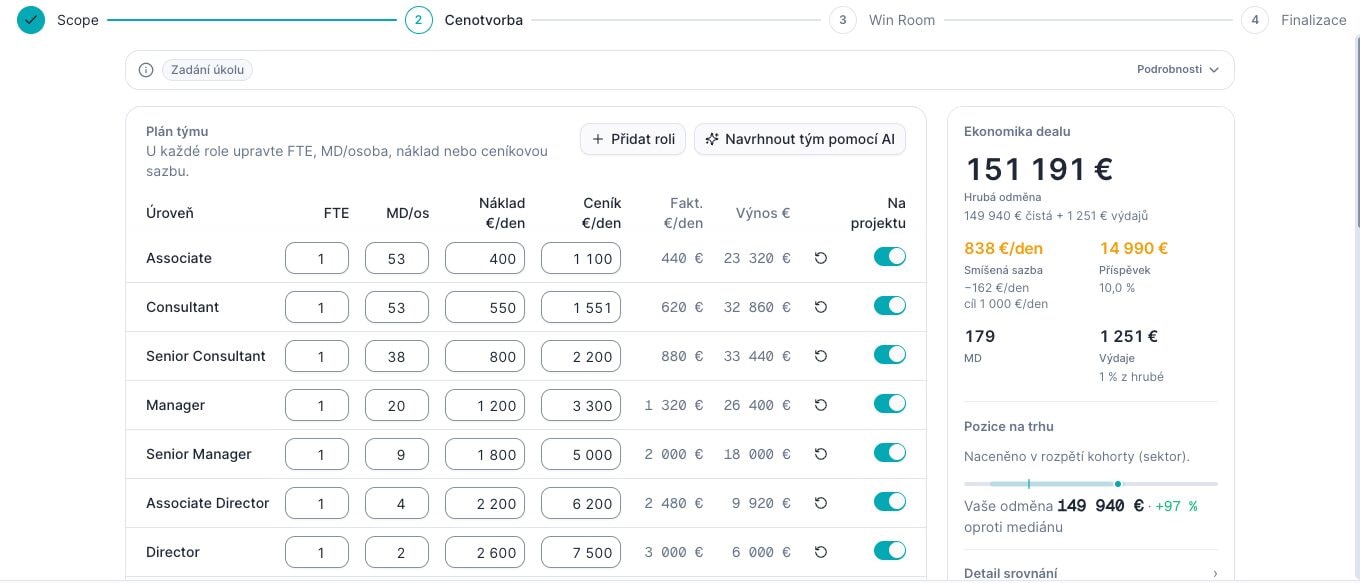
Team plan
Who works on the deal, with an AI proposal to start from.
An AI challenge before approval
Before the deal goes for approval, the AI questions its weak points.
The decision stays in the process
Approve, approve with a condition or decline is the result of a process phase. The process routes on it like on any other approval, and the plugin never stores it.
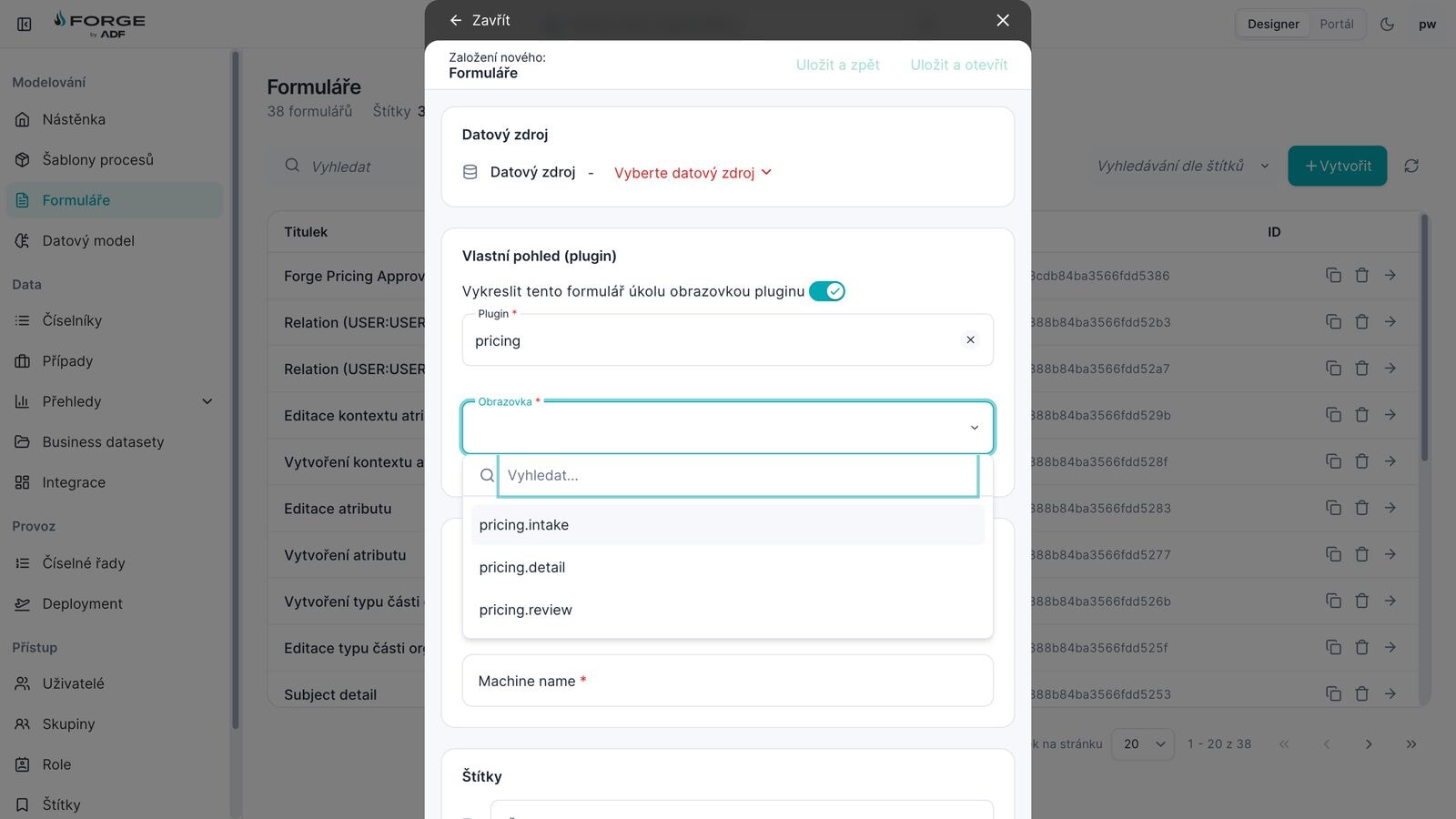
Switched on in the Designer.
A process designer turns a task form into a plugin screen: pick the plugin, pick the screen. That phase then opens the screen in the Portal; every other phase keeps its form.
AI inside a plugin stays on the server.
A plugin that uses Forge AI does so through operations it declares, with the same signing, privileges and time limits as every other call.
- Every AI call is a named operation
- Each AI feature is an operation the plugin declares, with its own privileges and time limit.
- The prompt lives on the server
- Prompts are written in the plugin’s server code. The browser sends input, never a prompt.
- Without Forge AI, the rest keeps working
- If Forge AI is not connected, the AI operations report it and everything else in the plugin carries on.
The contract between the platform and a plugin
- A token per call
- Every call carries its own token, signed with Ed25519 and bound to a hash of the exact request body. Its audience is that one plugin, and it expires after 60 seconds.
- Intersected privileges
- The token carries the user’s privileges intersected with those in the plugin’s manifest. An operation runs only for a user who holds one it requires.
- Key rotation without downtime
- Plugins hold public keys only. A new key reaches every plugin before the platform signs with it, and the old one is dropped once its last tokens have expired.
- State writes
- Compare-and-set against the version the operation read, validated against the plugin’s schema and capped in size. A lost race is retried once, then reported.
- Isolated styles
- A screen renders in a shadow root the Portal owns. The plugin’s CSS is adopted into it, so the Portal’s styles and the plugin’s never meet.
- Screens are code, never data
- A screen’s files are static and hold code only. Data reaches the screen solely through the context the Portal hands it.
Tell us the process that's costing you.
Bring one real process to the demo. We describe it to Studio together and you watch it take shape on a working platform — not on slides.